AI Piano Magic Keyboard
- 4.1
- Rating
- 10.00M
- Installs
- Free
- Price
 Analysis by App-foxy
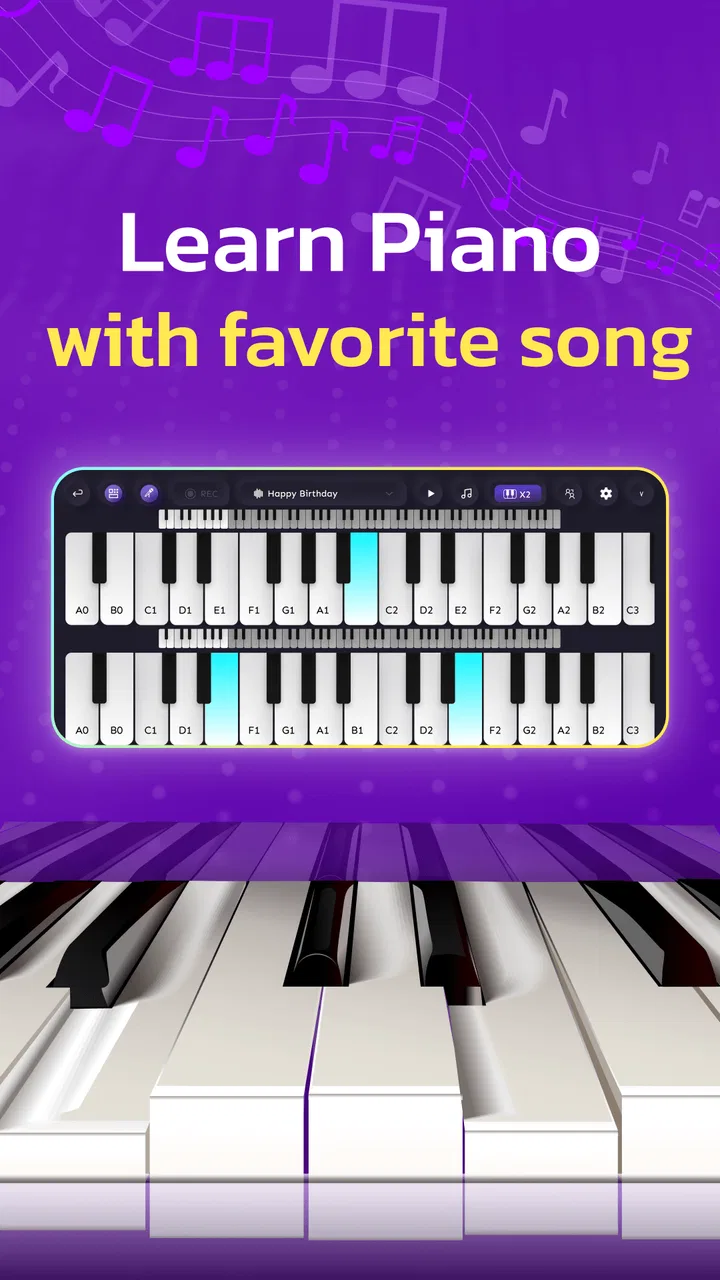
Learning a song on a phone sounds convenient, but the experience depends heavily on whether the app makes practice feel clear rather than cramped. I spent time with AI Piano Magic Keyboard, a free music and audio app from GambiSoftVn, and found that its strongest quality is its approachable starting point. The idea is simple: use familiar songs as the reason to sit down at the keyboard, then build comfort through repeated attempts instead of beginning with a heavy lesson structure.
That makes it appealing to someone who has always wanted to try piano but does not own an instrument. It is also useful for casual players who want a quick practice session during a break. I would not treat it as a complete replacement for a teacher, a full digital piano, or a serious notation program. Its value is more focused: it lowers the barrier between wanting to play and actually touching the keys.
How the everyday practice flow feels
My preferred way to use the app is to begin with a song I already recognize. That matters because listening familiarity gives me an immediate sense of timing. Instead of spending the first session trying to understand an unfamiliar exercise, I can concentrate on where the notes appear, how quickly the pattern moves, and which parts make me hesitate.
You May Also Like

 Blood Strike: 2.5 Anniversary
Blood Strike’s Loadouts Turn Every Drop Into a Tactical Gamble
A close look at Blood Strike’s custom loadouts: how fast access to signature weapons reshapes its battle royale rhythm, rewards preparation, and narrows the gap between fights.

 Pandora - Music & Podcasts
Pandora’s Music Is Easy to Start, but Harder to Recover
Pandora’s strength is its low-effort path from a seed to a station. Its weak spot is how much confidence it asks you to place in connection, setup, and quiet recovery.

 8 Ball Pool
 Is Built on Rivalries, Rematches, and Routine
A close look at the rivalries, rematches, shared routines, and unanswered safety questions that turn a quick pool match into a persistent mobile community.

 Samsung Music
’s Quiet Strength Is Playing What You Already Own
Its reach comes less from spectacle than from dependable access to a personal library. That simplicity is both the app’s strongest retention engine and its ceiling.

 AccuWeather: Weather Radar
AccuWeather Review: A Quick, Clear Forecast for Everyday Decisions
For everyday plans, the best forecast is the one you can understand quickly. AccuWeather makes rain timing, radar, and local conditions easy to act on, with a few trade-offs.

 Hill Climb Racing
Why Hill Climb Racing Still Turns Crashes Into One More Run
A tiny car, a bumpy hill and one more upgrade: Hill Climb Racing keeps resurfacing because its simple chaos makes every near-miss feel personal.
More From Our News Desk
View All News


The baseline workflow is best kept short. I choose a piece, play through a section without worrying about perfection, notice the first point where my hands lose track, and then repeat that passage. This is more productive than restarting from the beginning every time. The app works well as a practice surface when I use it in small, deliberate loops rather than as background entertainment.
On a phone, screen space naturally changes the experience. The keyboard is convenient for quick access, but it does not provide the same physical separation, key travel, or visual scale as a real piano. I found that I had to watch my finger position more carefully, especially when several notes arrived close together. That is not a flaw unique to this app; it is the basic trade-off of learning on a touchscreen.
A realistic use case is a short evening routine. After work, I might spend a few minutes replaying one song section, then stop before fatigue turns the session into random tapping. This approach suits beginners because progress is easier to notice when the target is specific. Rather than saying “I will learn piano tonight,” I can aim to play one recognizable phrase with fewer pauses.
The app is also a reasonable introduction for children and families, helped by its Everyone content rating. I would still supervise younger users during the first sessions, not because the concept is complicated, but because a child may need help understanding whether the goal is to follow the notes, explore sounds, or simply enjoy playing. Clear expectations make the first experience less frustrating.
The first habit that makes a difference
I recommend separating discovery from practice. During the first pass, I explore the song and accept mistakes. During the second pass, I focus on one troublesome transition. On the third, I try to connect that transition to the notes before and after it. This simple sequence turns the app from a novelty into a repeatable learning tool.
Another useful habit is to keep the phone stable. A shifting device makes accurate tapping harder and encourages the player to chase the screen with their hands. A stand or a firm surface improves the experience without changing anything inside the app. I also prefer practicing with the device positioned so both hands can see the keyboard without blocking the display.
The biggest beginner mistake is trying to win the entire song before understanding its difficult moments. AI Piano Magic Keyboard is more rewarding when I treat each attempt as information: which notes feel natural, where my timing slips, and whether I am relying too much on visual memory.
Settings and choices worth checking before repeating a song
Before settling into a routine, I would spend a little time checking the available song and keyboard controls rather than immediately starting a long session. The useful question is not “Which option looks impressive?” but “Which choice will make the next ten minutes easier to understand?” A comfortable layout and a song that matches my current ability are more valuable than constantly switching between possibilities.
Experienced users can make the app feel more consistent by choosing one familiar starting position and keeping their practice setup unchanged. If I move the phone, change my hand placement, and select a different song after every mistake, I cannot tell whether I am improving or simply adapting to new conditions. Repetition becomes much more informative when the basic setup stays steady.
It is worth paying attention to how the keyboard responds to quick sequences. Touchscreen instruments can make two nearby notes feel visually similar, especially when I am looking at the next prompt instead of my fingers. Slowing my hands mentally, even when the song itself is lively, helps me identify whether the problem is timing, position, or simply rushing.
The app’s free price is a major reason to try it without much commitment. That makes it suitable for curious beginners who are not ready to buy a keyboard or subscribe to a structured course. At the same time, free access should not create unrealistic expectations. A no-cost mobile app can provide a useful starting point, but it cannot give the physical feedback of weighted keys or the personal correction of an instructor.
Device compatibility is also straightforward for many older phones because the app requires Android 6.0 or later. That broad requirement is helpful if I am using a spare device for practice. Still, the quality of the session depends on the individual phone: a small display, delayed touch response, or weak speaker can make the keyboard less comfortable even when the operating system is supported.
Small workflow changes that improve accuracy
I get better results when I divide attention into three stages. First, I watch the note path and learn the shape of the passage. Next, I play slowly enough to keep my hand position stable. Finally, I try to restore the song’s natural flow. Skipping the middle stage is tempting, but it usually produces the same mistake at the same location.
When a passage feels difficult, I avoid changing several variables at once. I keep the same song, the same device position, and the same starting point, then work on one issue. If the notes are correct but the sequence feels uneven, I focus on spacing. If the rhythm feels fine but I miss keys, I focus on hand placement. This diagnosis is more useful than simply repeating the entire piece louder or faster.
Another practical tip is to end a session after a clean partial success. I do not need to finish the whole song every time. Stopping after a difficult phrase becomes noticeably more reliable gives me a clear starting point for the next session and prevents tired practice from reinforcing careless movements.
Faster patterns for players who already know the basics
Once the keyboard feels familiar, I find it more efficient to practice in patterns instead of treating every song as one uninterrupted challenge. I identify repeated shapes, such as a similar movement appearing in more than one phrase, and use the first occurrence to prepare for the next. This is where a recognizable song helps: my memory of the melody lets me anticipate structure rather than react to every note as a surprise.
I also use a “mistake map.” After one full attempt, I remember the two or three places that caused the most trouble and return to those points first. There is little value in spending most of the session replaying sections I can already handle. The app becomes more powerful when I use it to target weaknesses instead of measuring success only by whether I reached the end.
For a faster learning cycle, I alternate between a familiar song and a slightly less comfortable one. The familiar piece keeps motivation high and reveals whether my control is improving. The harder choice exposes weaknesses in positioning or timing. Doing only easy songs can create confidence without much growth, while doing only difficult songs can make the app feel discouraging.
One trade-off is that touchscreen practice can reward visual reaction more than genuine keyboard awareness. I may follow the display successfully while still struggling to locate notes without looking. To counter that, I occasionally glance away for a brief moment during a familiar passage, then return to the screen. I would not use this as a formal test, but it shows whether I am learning the musical pattern or merely chasing prompts.
Compared with a traditional piano-learning app built around lessons, theory, and graded exercises, AI Piano Magic Keyboard feels more immediate and song-centered. That is its advantage for casual learners. A structured course is usually better for posture, reading notation, technique, and a carefully staged curriculum. Compared with a virtual piano that is mainly designed for free play, this app has a clearer practice purpose because the song-based approach gives each session direction.
It also differs from a real keyboard in an important way: a physical instrument teaches spacing and touch through the hands, while the phone emphasizes convenience and visual guidance. I would choose this app to test interest, practice away from home, or keep a musical habit alive. I would choose hardware or lessons when the goal becomes serious technique.
Where the approach reaches its limits
The largest limitation is the touchscreen itself. Even a well-designed mobile keyboard cannot fully reproduce the feel of piano keys. Beginners may enjoy the accessibility, but they should understand that skill learned on a small screen may not transfer perfectly to a full-size instrument. Finger distance, pressure, and hand posture all change when moving to real keys.
The app can also be a poor fit for someone who wants a formal path through music theory. If my priority is learning scales, reading sheet music in depth, understanding harmony, or receiving detailed correction, I would look for a dedicated educational platform or work with a teacher. AI Piano Magic Keyboard is better at encouraging hands-on repetition than explaining why a chord works.
Song familiarity brings another exception. A known melody makes practice inviting, but it can also let me guess the next note without truly observing the keyboard. For that reason, I would occasionally choose a piece that is less familiar or deliberately slow down a passage I already know. The aim is to keep musical memory from hiding weak finger control.
There is also a motivation limit. A free app is easy to open, but that convenience can make it easy to abandon after a few casual attempts. I get more from it when I attach practice to an existing routine, such as using it at the same time each evening or completing one focused passage before switching to entertainment. Without that habit, the app risks becoming something I admire briefly rather than use consistently.
Who should install it, and who should choose another tool?
I would recommend it to a complete beginner who wants an inviting first step, to a casual music fan who learns best through songs, and to an existing player who wants a portable way to rehearse simple passages. It is especially attractive when buying a keyboard is not practical yet. The free model lowers the risk of experimenting, and the Everyone rating makes it suitable for a broad household audience.
I would be more cautious if the intended user is already pursuing advanced piano technique. A serious player may find the phone keyboard too limited, while someone preparing for formal study may need notation, theory, and feedback that this focused format does not provide. In those cases, a real instrument, a teacher, or a more comprehensive course would be the better investment of practice time.
GambiSoftVn has kept the app’s identity clear: it is a music practice tool built around accessible piano interaction rather than a broad studio environment. The current version is 67.0, and the app has reached over ten million installs with an average rating of 4.1 from around one hundred fourteen thousand ratings. Those figures suggest that the format has found a substantial audience, but they do not remove the personal question of whether touchscreen playing matches my learning style.
My verdict after building a repeatable routine
AI Piano Magic Keyboard works best when I use it as a low-pressure bridge into piano, not as a complete musical education. Its song-first design gives beginners a reason to return, and its portable format makes short practice sessions realistic. I especially like the way a familiar melody can turn a vague ambition into a concrete task: learn this phrase, fix this transition, and try it again tomorrow.
The most effective users will combine the app with simple discipline. Keep the device steady, choose a manageable song, isolate mistakes, repeat difficult patterns, and occasionally check whether the fingers are learning or merely following visual prompts. These habits reveal both the app’s strengths and its boundaries without requiring complicated methods.
Released on March 25, 2025, it is a sensible free starting point for anyone curious about playing piano on a mobile device. I would recommend giving it a fair trial if convenience and familiar songs matter more to you than formal instruction. If your goal is expressive performance on a full keyboard, treat it as a supplement rather than the destination. For quick practice, early exploration, and building the habit of returning to music, it earns a place on my phone.
FAQs for AI Piano Magic Keyboard
01What is AI Piano Magic Keyboard and how does it work?
AI Piano Magic Keyboard is a mobile application that transforms your smartphone into a virtual piano. Utilizing advanced AI technology, it provides real-time feedback and guidance, making it suitable for both beginners and experienced pianists. The app offers interactive lessons, various sound effects, and customizable settings to enhance your learning experience.
02Is AI Piano Magic Keyboard suitable for beginners?
Yes, AI Piano Magic Keyboard is designed to cater to all skill levels, including beginners. It offers step-by-step tutorials, interactive lessons, and feedback to help new learners develop their skills effectively. The app’s intuitive interface makes it easy for anyone to start playing without prior experience.
03What features does AI Piano Magic Keyboard offer?
AI Piano Magic Keyboard includes a range of features such as interactive tutorials, a wide selection of songs, real-time feedback, customizable keyboard settings, and a library of different sound effects. The app also has a recording function, allowing users to capture their performances and track their progress over time.
04Does AI Piano Magic Keyboard require an internet connection?
While some features of AI Piano Magic Keyboard can be accessed offline, such as basic lessons and playing modes, an internet connection is recommended for accessing online song libraries, updates, and community features. This ensures you have the latest content and can fully utilize the app’s capabilities.
05Are there in-app purchases or subscription options in AI Piano Magic Keyboard?
AI Piano Magic Keyboard offers both free and premium content. While the core features are free, there are in-app purchases and subscription options available for advanced lessons, exclusive songs, and additional features. These options allow users to customize their learning experience based on their preferences and goals.
Pros
- Intuitive interface for easy navigation.
- Wide range of musical instruments available.
- Customizable keyboard layouts.
- Offline mode for uninterrupted practice.
- Real-time feedback to improve skills.
Cons
- Limited free features without subscription.
- Occasional latency on older devices.
- Requires in-app purchases for advanced tools.
- Ads can be distracting during use.
- High battery consumption during long sessions.

AI Piano Magic Keyboard
Gallery